
1Get started
- Turn on Wi-Fi in muOS and check that the date and time are right.
- Open Applications → PocketKode Radio.
- A opens, B goes back. While something plays, MENU opens Now playing from any screen.
Handheld app
Internet radio and podcasts on your game console, with the screen off to save battery. Stations from around the world, podcasts you can subscribe to and download.
✓ Your download is starting… If it doesn't, tap here.
Every system
What it does
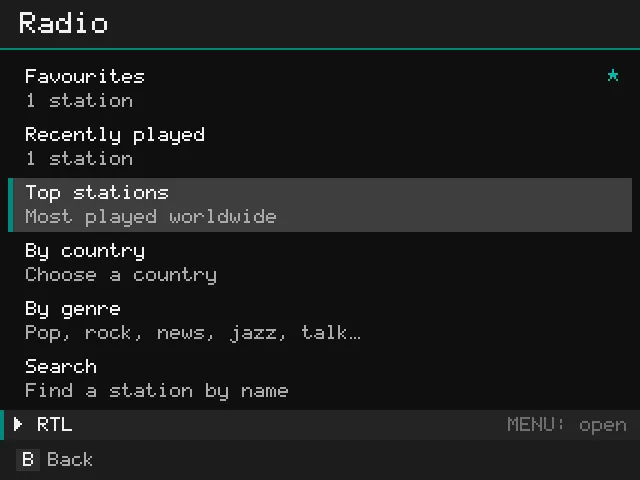
Top stations, by country, by genre and search, from the community-run Radio Browser directory. Many show what is on air.
Search or browse the top podcasts, subscribe, and play episodes. Where you stopped is remembered for every episode.
Download episodes to listen without Wi-Fi, for example on the road.
Keep your stations one button away, and pick up again with what you listened to last.
Turn the screen off to save battery while it plays, and stop after 15 to 90 minutes.
Pause, skip 15 or 30 seconds and playback speed with the buttons, and the volume with the game console's own VOL+ / VOL− buttons.
Screenshots
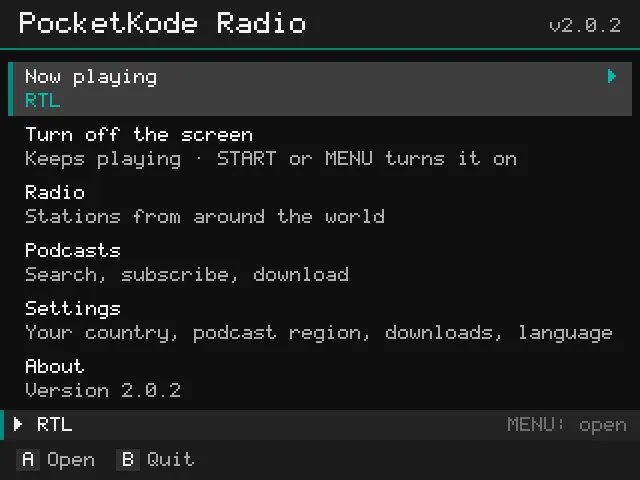
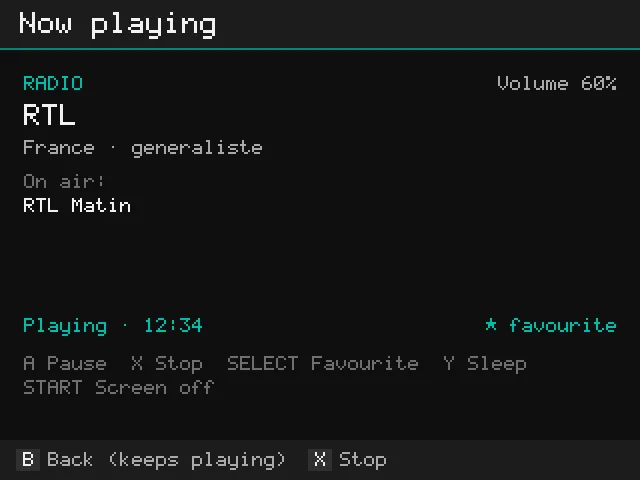
Screenshots from muOS on the Anbernic RG40XXH. Other systems may look a little different.
Install
ARCHIVE folder on SD card 1 (for example with Wi-Fi Transfer).Roms/APPS folder (PocketKode_Radio.sh, the PocketKodeRadio folder and Imgs) into Roms/APPS on SD card 1, with a card reader or over Wi-Fi (Samba or SFTP).On the stock OS, switching the screen off and in-app updates aren't available yet: get new versions from this page.
In Now playing: A play or pause, SELECT favourite, Y sleep timer, START screen off (START or MENU turns it back on), B back while it keeps playing. Volume: the game console's VOL+ / VOL− buttons.
Guide
The basics: stations, podcasts, the screen off and the sleep timer.
Many stations show the song or show that’s on air.
Downloaded episodes play without Wi-Fi, and the app remembers where you stopped in every episode.
| Always | A play / pause · Y sleep timer · START screen off · X stop · B back (keeps playing) |
|---|---|
| Radio | SELECT favourite |
| Podcast | ◀ ▶ back 15 s / forward 30 s · L1/R1 speed (0.75x to 2x) · SELECT download |
When a new version is out, Update available appears on the home screen. Press A to update; your favourites, podcasts and settings stay.
Stations come from the community-run Radio Browser directory. Podcast search and charts come from Apple's public podcast directory, and episodes from each show's own feed. Everything is played straight from the station or podcast: nothing is recorded, stored on pocketkode.com or re-shared. Stations and podcasts belong to their owners.
Found a bug or have an idea? Open an issue on GitHub or email feedback@pocketkode.com. If something went wrong, mention your device and muOS version, and attach logs/app.log from the app's folder if you can.